PER27 Digital Watch Face
PERSONA Watch FacePersonalization
4.2150.00 Reviews
- Version
- Varies With Device
- Installs
- 10.00K
- Age Rating
- Everyone
Screenshots
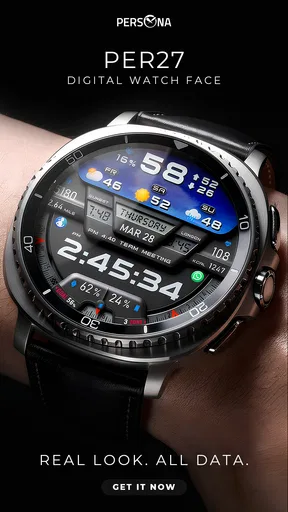
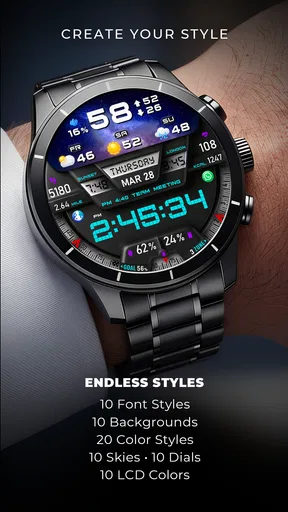
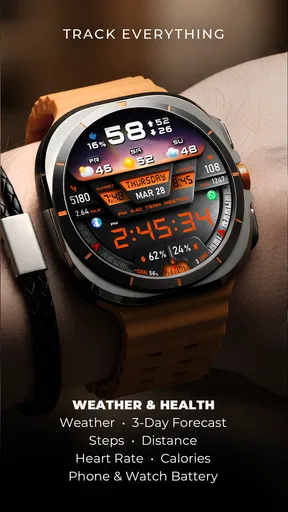
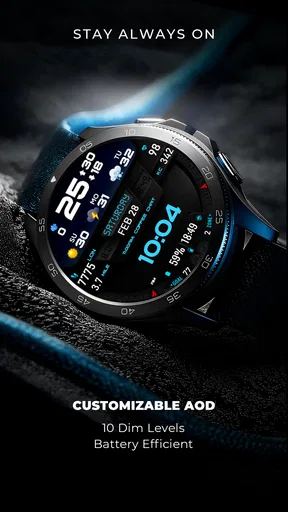
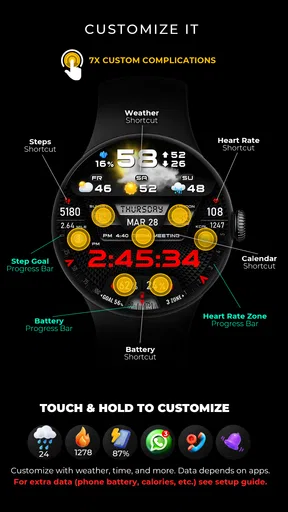
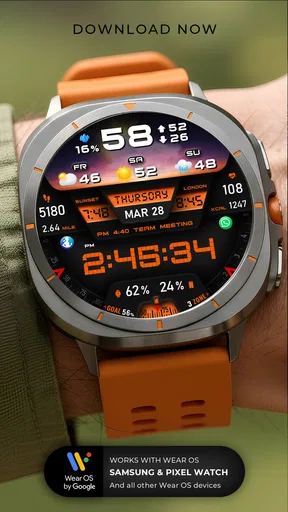
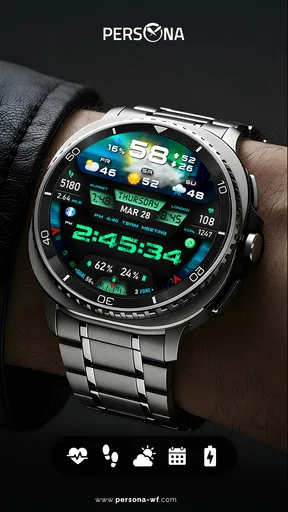
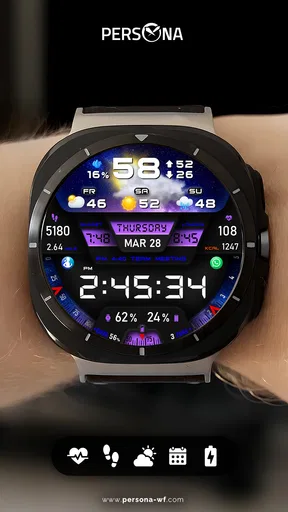
Our Review of PER27 Digital Watch Face
 Analysis by Appyee
My main take on PER27 Digital Watch Face is that it aims for a useful balance: a digital layout with room for glanceable information, without turning the watch into a wall of tiny details. That makes it most appealing if you want your wrist display to feel more personal and practical than a basic clock, but still be readable at a glance. I’d treat it as a focused Wear OS watch-face choice, rather than a broad smartwatch app for every platform.
What to consider before choosing a face
A watch face is something you see in brief, repeated moments: checking the time before a meeting, looking down while walking, or deciding whether to bring a jacket. That makes legibility and the placement of information more important than a long feature list. A data-rich digital design can reduce the need to open separate screens, but only if the details you choose are actually useful to you.
Before settling on a layout, I’d think about what I most often check. If it is the time and date, extra information may only add visual noise. If I regularly glance at activity or weather details, those elements can make the face more worthwhile. The practical choice is not to display everything available; it is to keep the few items that save me a tap or a search.
Where it fits in a daily routine
Imagine getting ready for work: I check the time while packing, glance at the weather before choosing a coat, and later use a quick look at my wrist to keep track of activity. A face that brings preferred information into view can make those small checks feel more direct. It is not a replacement for dedicated weather or fitness apps, but it can be a convenient front door to details I already care about.
That convenience is especially useful when my phone is in a bag or pocket, or when taking it out would interrupt what I’m doing. On a walk, for instance, a glance can be less awkward than unlocking a phone. The trade-off is that a watch display is small, so I would prioritize a clean arrangement over packing in every available complication.
How to judge the purchase
PER27 Digital is a paid watch face, priced at $2.99, so I’d decide based on whether I expect to use its particular digital presentation every day. Someone who changes faces often or is happy with a built-in option may not get enough value from another purchase. Someone who wants a more considered layout and expects to keep it as a regular choice has a clearer reason to pay.
The app is made by PERSONA Watch Face and is listed in the personalization category. Its audience rating averages 4.1 from around 660 ratings, with over 10,000 installs. It is rated for Everyone and was released on February 15, 2024. Those figures offer a little context, but I would still make the decision around fit: whether the design works on my own watch and whether its information earns the space it takes up.
First Impressions
Upon installing the PER27 Digital Watch Face, I was immediately drawn in by its minimalistic yet elegant design. It’s like having a piece of modern art right on your wrist. The app offers a plethora of customization options, making it super easy to tailor the watch face to match your mood or outfit. As someone who loves a bit of personalization, this was a huge win for me.
Customization Galore
One of the standout features of this app is its impressive array of customization options. You can tweak everything from colors to complications. Want a splash of red to match your sneakers? Done. Prefer a classic monochrome look? Easy peasy. The intuitive interface makes these adjustments a breeze, even if you’re not particularly tech-savvy.
The app also lets you choose from a variety of widget options. Whether you want to keep an eye on your steps or check the weather with a quick glance, it's all right there. I found the ability to add and remove these widgets handy for keeping my watch face clutter-free and focused on what really matters to me.
Performance and Usability
Now, a watch face might look fantastic, but if it drains your battery or lags, it’s a hard pass. Thankfully, the PER27 shines in this department. It’s efficient, ensuring your smartwatch doesn’t turn into a wrist-bound brick halfway through the day. I tested it extensively, and I’m happy to report that the battery life remained consistently solid.
The animations and transitions are smooth, adding a touch of sophistication without being over the top. Navigating through settings and options is seamless, and I didn’t encounter any bugs or crashes during my time with the app.
Compatibility and Integration
One important distinction is that this is a Wear OS watch face. I would not choose it on the assumption that it works on an Apple Watch simply because the phone used to manage a watch might be an iPhone. The watch’s operating system is what matters here. If I were buying it, I’d first confirm that my particular watch runs Wear OS and that the face can be selected through the watch-face settings available to me.
Additionally, the app syncs effortlessly with various health and fitness applications. If you’re a fitness enthusiast, you’ll appreciate having your data front and center without needing to dig through multiple apps. This integration is particularly handy if you’re tracking your progress or training for an event.
Making the layout work for you
I’d set up the face in two passes rather than trying to perfect it all at once. First, I’d choose a color and overall look that keeps the time easy to read in the situations where I use my watch most. Then I’d add only the complications I check repeatedly. This simple order helps avoid a common personalization trap: choosing attractive options individually and ending up with a crowded whole.
There is also a useful trade-off between information and glanceability. A step count or weather detail can be valuable when it answers a question I would otherwise reach for my phone to answer. If I rarely act on a piece of information, though, keeping it on the main face gives it visual weight without giving me much practical benefit. I’d treat the available space as limited and reserve it for the details that change what I do next.
Who will appreciate it, and who may not
This face makes the most sense for someone who likes digital timekeeping, enjoys adjusting the look of a watch, and wants selected information close at hand. It can also suit a person who prefers to make a watch feel personal without changing the device itself. The ability to pare back widgets is a meaningful part of that appeal: customization is not only about adding color or detail, but also about deciding what to leave out.
I’d steer away if I primarily want an analog dial, prefer a stock face that I never need to configure, or use a watch outside Wear OS. It may also be a poor match if I expect a watch face to replace the deeper tools in a fitness or weather app. A face can make useful information easier to spot, but a small display is not the place for detailed analysis or long interactions.
Compared with the usual alternatives
Compared with a basic built-in digital face, PER27 Digital is a more personalization-oriented option for people who want to shape the look and choose what appears on the wrist. Compared with a heavily decorative or analog-style face, its digital, information-focused direction is the more sensible fit for quick checks. Neither approach is automatically better: I’d pick the simplest built-in face if all I need is the time, and choose this one when its combination of styling and glanceable details is something I expect to use.
There is a further choice between a face that shows a lot and one that stays spare. More visible details may reduce the number of times I open another screen, but they can also make a quick glance less immediate. I’d judge the result while moving around in ordinary conditions, not only while browsing customization options on a phone. A layout that looks attractive in a settings preview still needs to make sense at arm’s length.
Final Thoughts
All in all, the PER27 Digital Watch Face is a stellar choice for anyone looking to add a touch of style and functionality to their smartwatch. It offers unparalleled customization options and performs like a champ, all while looking sleek and modern. Whether you’re a tech geek or just someone who appreciates a well-designed watch face, this app is worth checking out.
So, if you’re ready to elevate your smartwatch game, why not give the PER27 Digital Watch Face a whirl? It might just become your new favorite wrist companion.
My verdict
I’d recommend it to a Wear OS owner who wants a digital face that feels deliberately chosen rather than accepted by default, and who will take a few minutes to make the information useful. I’d skip it if the current watch face already does the job or if the appeal is mainly the idea of having lots of data visible. The strongest reason to choose PER27 Digital is the chance to combine a personal look with a practical set of glanceable details; the key is being selective about what earns a place on the screen.
Verdict
Strengths of PER27 Digital Watch Face
- Elegant and customizable design.
- Battery-efficient functionality.
- Real-time weather updates.
- User-friendly interface.
- Multiple color themes available.
Limitations of PER27 Digital Watch Face
- Limited free features.
- Occasional sync issues.
- Requires Wear OS 3.0+.
- No third-party app integrations.
- Paid version for full access.
Other Releases by PERSONA Watch Face
View All
PER12 Digital Watch Face
Personalization3.6

PER8 Digital Watch Face
Personalization4.0

PER32 Ultra Hybrid Watch Face
Personalization4.1

PER23 Digital Watch Face
Personalization4.1
Similar Picks in This Category
View All
Microsoft SwiftKey AI Keyboard
SwiftKey4.3

Wallpapers
Google LLC4.1

Zedge™ Wallpapers & Ringtones
Zedge4.7

Yandex Browser with Alice AI
Direct Cursus Computer Systems Trading LLC4.3

Ringtone Maker:create ringtone
Big Bang Inc.4.7

Fonts Keyboard
Fonts Keyboard3.9
Frequently Asked Questions
What features does the PER27 Digital Watch Face offer?
The PER27 Digital Watch Face provides a sleek, customizable interface with options to display various metrics such as time, date, weather updates, and battery status. Users can personalize the color schemes and layout to fit their style. It's designed to be energy-efficient, ensuring minimal battery drain on your smartwatch.
Is the PER27 Digital Watch Face compatible with all smartwatches?
The PER27 Digital Watch Face is compatible with most Android-based smartwatches. However, it is essential to check the specific compatibility details on the app store to ensure it works with your device. Unfortunately, it is not available for iOS devices at this time.
How user-friendly is the PER27 Digital Watch Face for beginners?
The PER27 Digital Watch Face is designed with user-friendliness in mind. Its intuitive interface allows users to easily navigate settings and customize the display. Even those new to smartwatch customization will find it straightforward to adjust features and access the information they need quickly.
Does the PER27 Digital Watch Face consume a lot of battery power?
One of the standout features of the PER27 Digital Watch Face is its energy efficiency. It has been optimized to minimize battery consumption while still delivering a vibrant display and real-time updates. Users generally report minimal impact on battery life compared to other watch faces.
Are there any in-app purchases within the PER27 Digital Watch Face app?
The PER27 Digital Watch Face may offer some premium customization options through in-app purchases. While the basic features are free to use, users can opt to purchase additional styles or advanced metrics. It's best to review the app store listing for a detailed breakdown of available purchases.
